
Right now in PDF Designer if you need to change the order that fields in a loop are shown, you have to add a column, move the data tag, change the header, move the one you want there, move the one out of the temp column to the new spot, change that header, delete the temp column, etc.... it is painful...
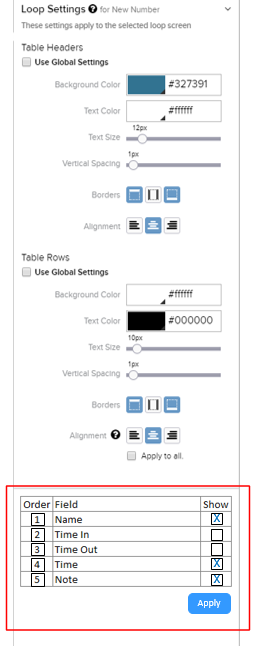
It would be nice to have a tool either in the Loop Settings or the App Outline in the left nav to allow us to just select / deselect which fields we want to show and then change the order with drag and drop and / or by changing the order indicators and clicking apply... then the loop could be added or re-added to the pdf builder area to show in the desired manner.
Something kind of like this mock-up:
7
Comments
Please sign in to leave a comment.
Howdy Nathan,
Thank you for this very detailed feedback and for taking the time to provide a mock-up screenshot! I can see how an improved method to move and select Loop fields in the PDF Designer would be helpful. I will be sure to provide this feedback directly to our Product Managers for their consideration.
This would be extremely helpful. I have had to add/remove fields from pdfs relatively often and it is really frustrating have to completely redo the loop on the pdf just to add the 1 extra field.
Another way to do this would be if the loop area looked like a non-looped screen where each field was individual so after the loop was generated if another field is added you just have to click and drag that field onto the pdf where you wanted it.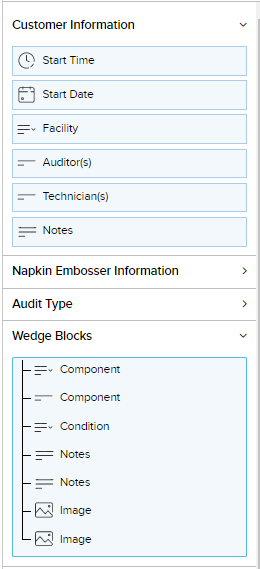
Howdy Katelyn,
Thank you for sharing this specific use case and solution example! This feedback is very helpful as our Product Managers are discussing how best to approach a complete overhaul of the PDF Designer.
Hi Chip,
Any good news from the Product Manager(s)? I don't see any improvement since 2 years back.
Hi Weber,
I don't have any updates since Chip posted this unfortunately but updating the PDF Designer is still in consideration by our product team. Once there is more information, I will be sure to update the community.