
In the PDF Designer, there are multiple global level settings (such as borders, font sizes, *padding*, etc).
For loops, there are global settings for the header color, borders, and alignment - but not header font / text...
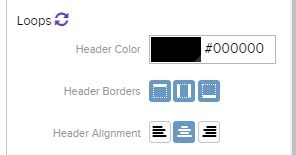
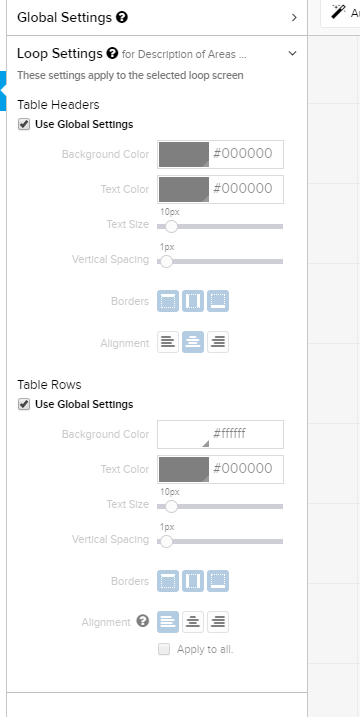
It would be nice to have font / text settings for loops (separately for rows and headers) available at the global level so that could be configured globally and then adjusted individually if needed.
Also, in the loop settings, the above mentioned settings are available - along with check boxes that allow inheriting global settings or not (just like most of the other settings in PDF Designer)... this is misleading since some of those settings don't exist globally yet. This feature request might reconcile this issue as well.
Thank you for your consideration.
Comments
Please sign in to leave a comment.
Howdy Nathan,
Thank you for this feedback, especially for the detailed description and screenshots! I can see how having separate font/text settings for Loop screens at the Global level would be helpful when customizing the Designer PDF.
I think this would be a great feature in being able to edit the view of our loop results in the PDF.
Any idea when this update will be made?
Howdy Katelyn,
Thank you for checking in on this Feature Request! Speaking honestly, we do not have an estimated timeline for updates to the PDF Designer.
Our Product Managers are in the early stages of planning for a complete overhaul of the PDF Designer. What complicates this matter is that the underlying technology for the PDF Designer needs to be replaced before any major changes can be implemented.
As new upvotes and comments related to the PDF Designer are added to the Community, we will continue to share this data directly with the Product Team, to emphasize which updates are most requested.