
Hello all! We have just released new versions of the GoCanvas mobile app for both Android and Apple devices. This release features updates that we think you’re going to love, so keep reading to see what’s new! Our focus this time around was making it easier to see the information you need. Thank you, as always, for your feedback on how we can make your experience using GoCanvas more powerful.
Workflow status improvements
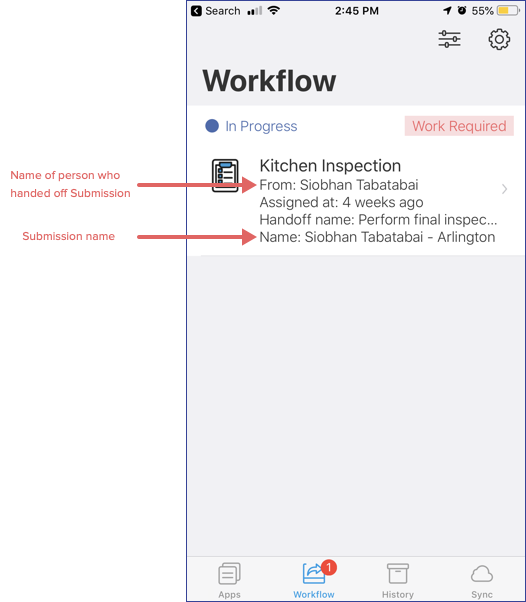
When a Handoff is assigned to you, you can now see who handed it off -- meaning you don't have to hunt for it in the App or on the GoCanvas website anymore!
If your Submission has a Submission Name, it will now be visible on the Workflow screen. This should help provide better context around what you've just been assigned.
Ability to view this week’s Dispatches
Dispatch users will be happy to know that with this update, users can see their upcoming dispatches up to seven days out from the current date. Having access to this information ahead of time can make it easier to plan out routes, tools needed for the job, and mental preparation.
- Future Dispatches can only be viewed, and not filled out ahead of time
- This feature is turned off by default -- contact support to turn it on for you
- Not currently suggested for accounts sending 100+ dispatches to their users at once
Ability to identify GoCanvas Submission in Square account
We’ve made it easier to reconcile your transactions in Square by bringing in the Submission ID (the unique ID in the footer of your PDF) as a note on the transaction.
Number keyboard for number fields on iOS
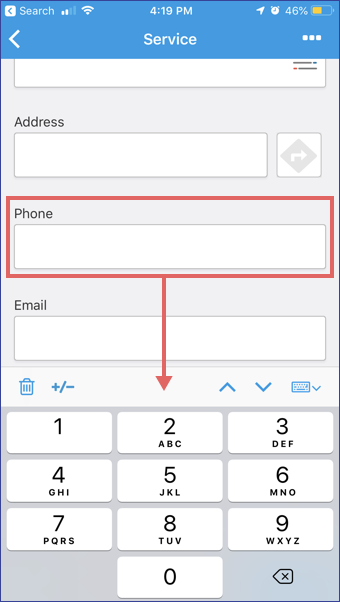
This update to the iOS mobile app reflects the existing functionality that the Android mobile app already has. A small but convenient change -- when entering content into a Number field, your number keyboard will pop up instead of your full keyboard.
Comments
Please sign in to leave a comment.