
Right now when entering a time in GoCanvas for Windows you are presented with a modal window like this, and the only way to change the values is to click the up and down arrows:
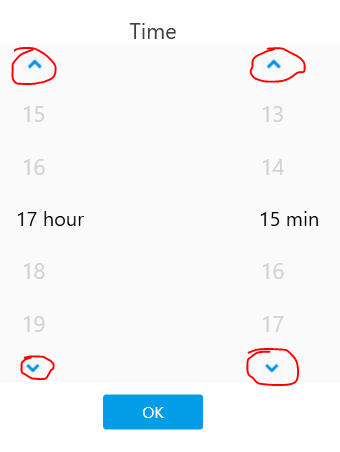
This style of entry on a PC takes an enormous number of clicks and a huge amount of time.
It would be good to improve the time entry by allowing some or all of these:
- Use the time tool as shown above but allow the user to:
- - - - Scroll with the mouse
- - - - Hold down the arrow to advance the "wheel" rather than having to click individual times
- - - - Click on a visible number above or below the number currently in focus to allow the rapid choice of a number without having to click until it is exactly in focus
- - - - Use the up and down arrow keys on the keyboard
- - - - Have a style choice that allows choosing time in 1, 5, 10, 15, 30, or 60 minute increments
- Maybe add a time chooser that shows a clock face with the ability to click or drag the hand around to the right time
It is great that you can click on the very far left part of the field and just directly type the time in.
5
Comments
Please sign in to leave a comment.
Interestingly, the ability to click on a visible number that's not in focus IS possible on iOS (and I assume Android). I'm going to ask around about this one, because... yeah, that's pretty slow.
Nathan,
Yes, this is pretty annoying.
However, I've found that you can click into the time field itself on the Windows client and manually enter the time.
It save an awful lot of clicking...
Donal,
Thank you. I found the same and noted that in the OP.
Keyboard-centric users would most likely type values into the field. It would be better to be able to tab in to the field and type the value rather than having to move a hand from the keyboard to the mouse, click in the very small area on the left side of the field to activate the box, move the hand back to the keyboard, type in a value, etc.
Users who prefer mouse / stylus / touch are presented with a similarly painful entry experience due to having to use the control as-is or make extra efforts to type data into the system.
I feel like it should be easy and relatively fast either way.