Permanently deleted user
It would be great if there was a field type called "password" that allowed users to enter a value without the actual text being displayed in the field, e.g. "*****" rather than "12345"
Field options could include things like "minimum number of characters", "must include a capital", "automatic password reset prompts", etc.
2
Comments
Please sign in to leave a comment.
Hi Fred,
This is an interesting request (and from a technical and security perspective, I think, a challenging one). Can you tell me a little bit more about how you'd use a field like this? Would it be to prevent users from using an App they aren't supposed to, or in order to set a password in a different system? Just trying to think about other ways to accomplish what you're after.
Thanks!
I would like to see this feature as well. With security being so necessary nowadays.
Hey Joe,
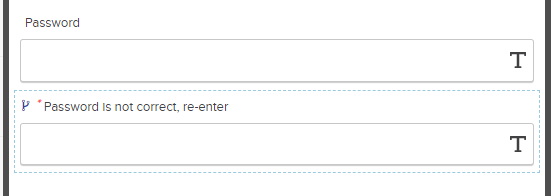
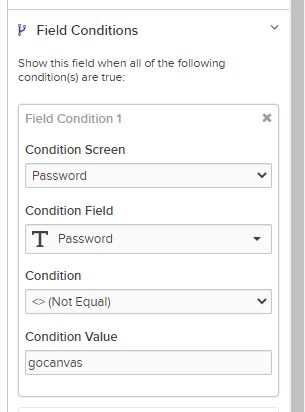
Although it is a workaround technically, we can use several features for data validation. Including hidden required fields and conditions. I have included some screenshots below to show a basic password configuration within the app but there are ways to make it more complicated.
In the screen shots below, we have a short text field where the password "gocanvas" would be entered. The second field is a required hidden short text field with the condition placed upon it that will "reveal" the field if the password is not entered correctly. The reason this field is hidden and required is to essentially "break" the app. The user cannot move forward because they cannot fill out of the required field because it is hidden. You can also add a static text field that will appear if the wrong password is entered so the user knows they entered the password wrong. Please let us know if you have any questions!