
Permanently deleted user
Can you add an option for numbers above 1000 to have commas when printed to a PDF? It seems like a simple thing to do...when you choose number, date, or currency it seems like you could give an option for commas or no commas for numbers like you give 2 different date formats. It would sure make my bid spreadsheet easier to read.
2
Comments
Please sign in to leave a comment.
Hi Alvin Eustaquio,
Thanks for posting to the Community and showing continued support for this request. As was commented above, I don't believe that commas would be accepted by integrations and exports due to what commas mean in that language. Commas are used to differentiate columns and cells in Excel, for example, or to indicate different options in a select list for SQL queries. Commas included in how the data is collected may confuse the data on the backend, which is why Custom PDFs can be designed to include commas while not impacting the collected data. The best way to re-format a number or calculation value without a custom PDF is to have the value entered again in a Text field, since Text fields have a little more allowance than a numeric field type. I apologize that I don't have a better update but perhaps this workaround could be implemented to make it easier to read those values in a Designer PDF.
It would be great to have a feedback on this post? I have a similar issue....
Hi Varun,
Unfortunately, I don't have any feedback to share regarding updates to this functionality currently. I appreciate you checking in, as it lets us know that there is additional interest in this feature request. I'll be sure to update this post if I hear any news regarding this functionality.
Thanks,
Siobhan
Commas wreck everything when importing/exporting data to csv files and SQL databases. This is a system/language command character.
Adding commas, the way you are asking, is probably never going to happen.
Commas for numbers of 1000 or greater are possible in a Custom PDF (we employ several customs) but seem difficult or impossible on the "Designer" Version of the PDF Output. We need this functionality. Commas cannot be the only reason why one is forced into a custom endeavor. Thank you, Dave Cramer - Penn Line Service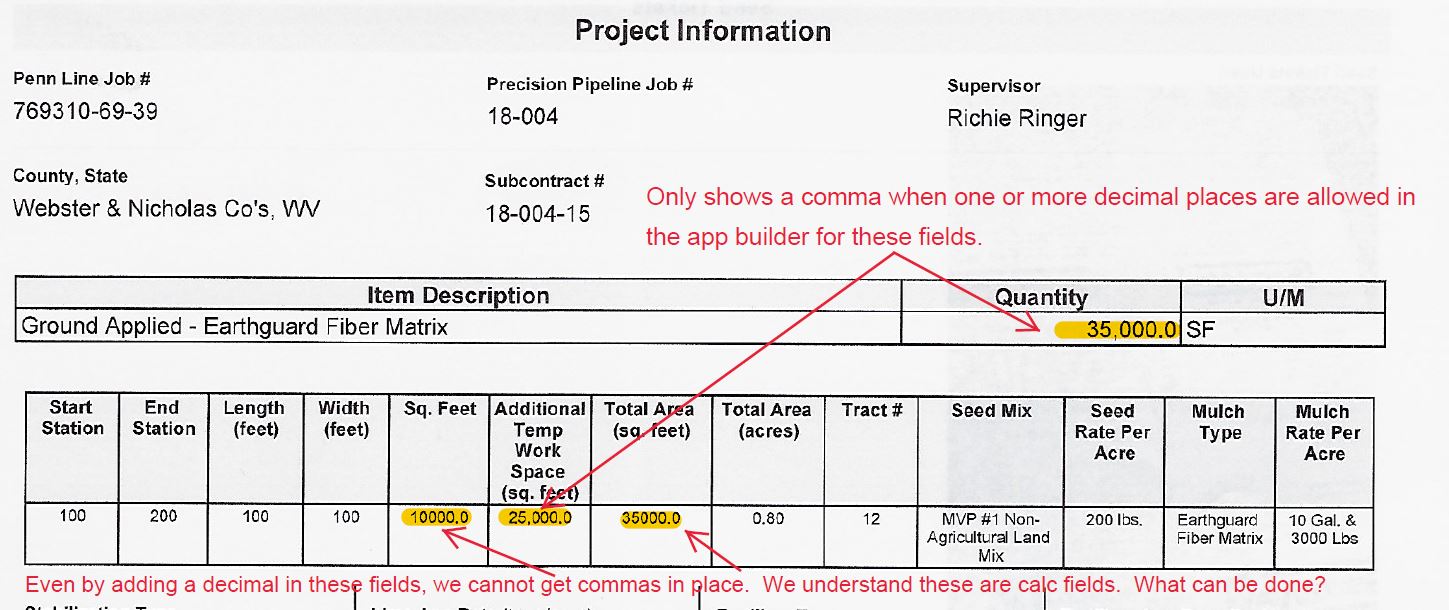
Hi Dave,
I understand your frustration with commas in large numbers, it is easier to read the output when a comma is provided for context. I don't recommend making any changes to an app that has a custom PDF but for the future, there may be a little work around that I have used before in different contexts. If the number field that allows decimals shows the comma on the PDF, perhaps we can use a number field after the calculation fields to re-enter the output that the calculation provides. I understand this is not an elegant solution and does require a momentary pause to re-enter that information, it could be a work around solution in the meantime. I would love to hear other ideas or solutions!
Hi. Could we kindly request an update regarding the status of this feature request? I have encountered a similar issue and would greatly appreciate any insights or progress you might have. Thank you for your attention to this matter!