
We have several apps that have several screens. Many times the value of one of the fields set on the first page of (or dispatched into) an app is a reference number, name, or something that users need to keep top-of-mind while working through the app pages.
It would be awesome if we had a check box option for "Include In Header" in the more section of the field properties for at least short text and number fields.
If no fields were selected for that or if the value(s) was/were blank, it could just not show, but once the value of a field was populated, the actual header of the app that is present on all screens could display like <field 1 value> - <field 2 value>, etc. Kind of like this mock-up:
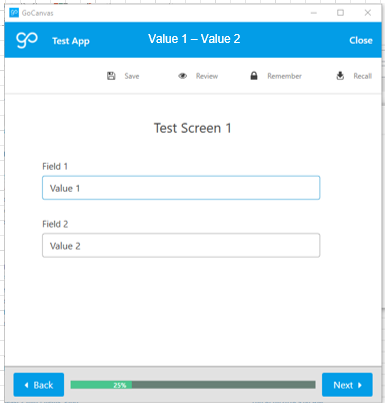
Of course it could be limited to a small number of fields and could possibly only display the first X characters of the selected field(s) to prevent a high degree of ridiculousness.
This would help out with not having to page back and forth in the app so many times when trying to recall or refer to a number or name, etc.
Thank you for your consideration.
Comments
Please sign in to leave a comment.
Hi Nathan,
Would a workaround for this be to use mirroring (either the field or the backdoor) to pull that data along? It obviously wouldn't be in the header, but you could put it at the top of every screen (or directly above any fields that may need to reference it).
Hi Sara.
Yes, that's what we're planning for a workaround. We just thought we would request this pie-in-the-sky idea as it would be nice not to have to scroll past the mirror field(s) and / or use the extra real estate required for that.
Thanks.
Also, while a mirror field can be added to a loop screen, it would be nice to just have this reference field up at the top and not have to submit it once for each row in a loop, etc.
Being able to have the header or screen name be based on reference data would help our forms as well. Right now we have generic "Section 1", "Section 2", etc names for the screens, but these are based on reference data so having the ability to dynamically name the screens "Section 1: Downstream slope", "Section 2: Outlet structure", etc would help our users navigate with Table of Contents forms. Each site may be inspected in a different order, and the users currently have to click each section from the Table of Contents and then see what the title is (static text), but naming the screen or allowing the static text from reference data in the TOC selection would be helpful.